
APA Title Page Format: Student and Professional Examples
Learn the correct APA Title Page Format for student and professional papers, with clear examples, key elements, and common mistakes to avoid.
APA Title Page: What It Includes and Why It Matters
An APA title page is the first page of a paper formatted in APA Style, and it gives readers the essential details before they reach your main text. In APA 7th edition, student papers and professional manuscripts use different title page formats, so it is important to know which version your assignment or publication requires. A student APA title page usually includes course and instructor details, while a professional title page includes a running head and may include an author note. Getting this page right helps your work look organized, credible, and ready for academic review.
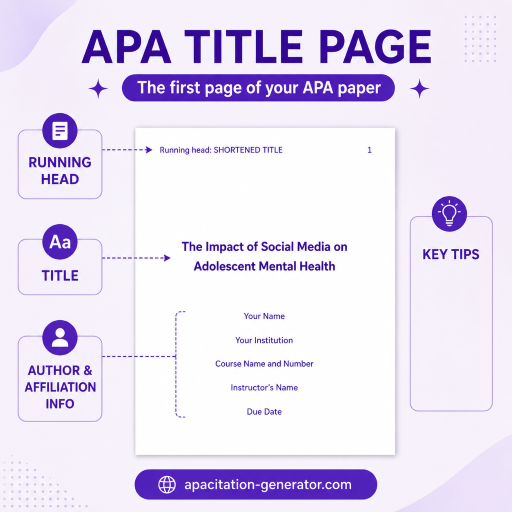
APA Title Page Format
Student APA Title Page Format
Most college and high school assignments use the student paper format unless your instructor says otherwise. A student APA title page should include:
- Paper title
- Author name
- Department and institution
- Course number and course name
- Instructor name
- Assignment due date
- Page number in the top-right header
Student APA Title Page Example
Effects of Social Media Use on Student Sleep Habits Jordan Smith Professional APA papers are usually prepared for journal submission or formal publication. This format includes many of the same core details as a student paper, but it removes course information and adds publication-focused elements. A professional APA title page should include: Running head: SOCIAL MEDIA AND SLEEP Effects of Social Media Use on Student Sleep Habits Jordan Smith Author Note The easiest way to tell the two formats apart is by looking at the extra details. Student papers include class information because the paper is being submitted for a course. Professional papers focus on publication details, so they may include a running head and author note instead. For students, the safest move is to follow the student title page format unless your instructor provides different requirements. For researchers, graduate students submitting manuscripts, or authors preparing journal articles, the professional title page is usually the better fit. A few small formatting errors can make an APA title page look messy. Watch out for these common issues: A clean APA title page should feel simple, balanced, and easy to scan. Before submitting your paper, check that your APA title page includes the right details for your paper type. Make sure the title is bold, centered, and in title case. Confirm that your name, school details, course information, instructor name, and due date are correct if you are writing a student paper. If you are preparing a professional paper, check the running head, author affiliation, and author note requirements. A well-designed title page is only the first step toward an APA-compliant paper. Once you've entered your paper details, you'll also need correctly formatted citations and a complete reference list. Our APA Citation Generator helps you create accurate APA references in seconds, making it easier to keep every part of your assignment consistent with APA 7 guidelines.
Department of Psychology, Westbridge University
PSYC 101: Introduction to Psychology
Dr. Emily Carter
March 14, 2026Professional APA Title Page Format
Professional APA Title Page Example
Department of Psychology, Westbridge University
Jordan Smith has no known conflicts of interest to disclose. Correspondence concerning this article should be addressed to Jordan Smith, Department of Psychology, Westbridge University.Student vs. Professional APA Title Page
Common APA Title Page Mistakes to Avoid
Quick APA Title Page Checklist
Frequently asked questions
Usually, no. APA 7th edition does not require a running head for student papers unless an instructor specifically asks for one.
The page number goes in the top-right corner of the header. The title page is page 1.
Yes. In APA 7th edition, the paper title on the title page should be bold, centered, and written in title case.
Student title pages include course, instructor, and due date information. Professional title pages include publication-focused elements such as a running head and, when needed, an author note.